
Pixxel
Documentation
Developer Guide
Pixxel API
Overview
About PixxelPixxel's ConstellationPixxel's Tech Demonstrators

Getting Started
AuroraQuick Start

Tasking
Tasking Basics

Know Your Customer (KYC)Know Your Business (KYB)Navigation to Order DeskInitiating a New Tasking Order

Available BandsetsCustom Bandsets
Ordering and Cart
Archive OrderingWorking with CartOrder Listing, Status and Details
Catalog and Delivery
My CatalogExport ImageryNaming Convention
Explore Images & Create AOIs
ExploreSearch Location and Draw/Upload AOISearch and Select ImagesSatellite DataAOI Info and Scenes
Analytics Tools

Spectral SignatureSplit Compare
Analytical Models
Insights in Aurora (AOI Screen)Model Marketplace

Workflows
Workflow and Jobs
Aurora Intelligence
OverviewImage Search
Legal Documents
Third Party Satellite Provider Documents
Pixxel
Documentation
Developer Guide
Pixxel API
Overview
About PixxelPixxel's ConstellationPixxel's Tech Demonstrators

Getting Started
AuroraQuick Start

Tasking
Tasking Basics

Know Your Customer (KYC)Know Your Business (KYB)Navigation to Order DeskInitiating a New Tasking Order

Available BandsetsCustom Bandsets
Ordering and Cart
Archive OrderingWorking with CartOrder Listing, Status and Details
Catalog and Delivery
My CatalogExport ImageryNaming Convention
Explore Images & Create AOIs
ExploreSearch Location and Draw/Upload AOISearch and Select ImagesSatellite DataAOI Info and Scenes
Analytics Tools

Spectral SignatureSplit Compare
Analytical Models
Insights in Aurora (AOI Screen)Model Marketplace

Workflows
Workflow and Jobs
Aurora Intelligence
OverviewImage Search
Legal Documents
Third Party Satellite Provider Documents
  1. Tasking
  2. Access the Order Desk
  3. Initiating a New Tasking Order

Initiating a New Tasking Order

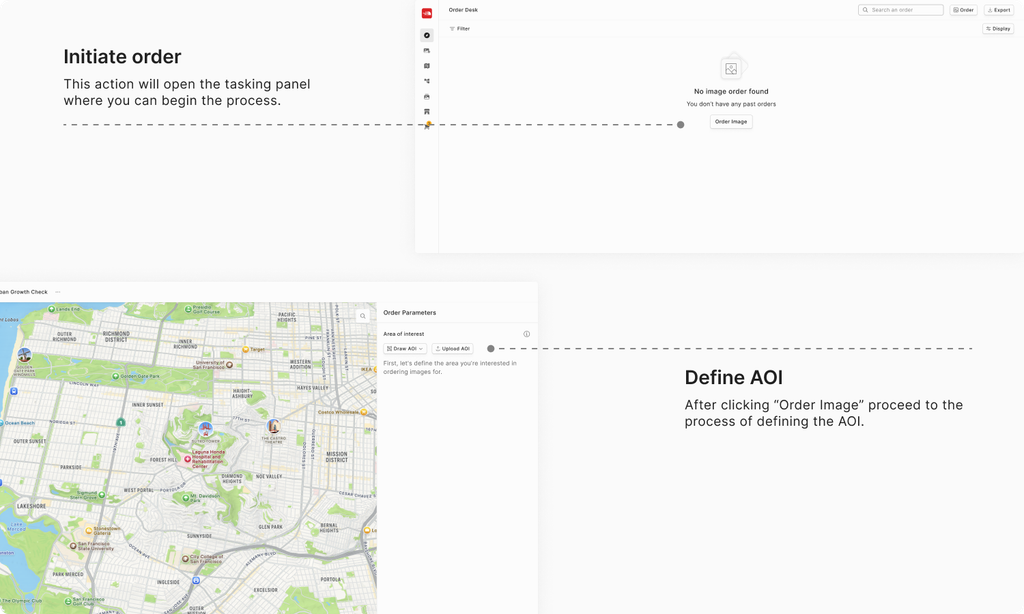
If you’re new to Order Desk, you won’t see any orders initially. To get started:

  • Click on "Order Image" button prominently displayed on the Order Listing page.
  • This action will open the tasking panel where you can begin the process of defining your Area of Interst (AOI), capture window and other imaging parameters

Helpful Tips

  • Dashboard Overview: The dashboard is designed to be intuitive. Once you’re on the Order Listing page, you can quickly access details of past orders or start a new one with a single click.
  • Support: If you encounter any issues or have questions, you can contact support via the Contact Support in the navigation menu on the left panel.

Navigation to Order DeskArea of Interest
On this page
Helpful Tips