
Pixxel
Documentation
Developer Guide
Pixxel API
Overview
About PixxelPixxel's ConstellationPixxel's Tech Demonstrators

Getting Started
AuroraQuick Start

Tasking
Tasking Basics

Available BandsetsCustom Bandsets
Ordering and Cart
Archive OrderingWorking with CartOrder Listing, Status and Details
Catalog and Delivery
My CatalogExport ImageryNaming Convention
Explore Images & Create AOIs
ExploreSearch Location and Draw/Upload AOISearch and Select ImagesSatellite DataAOI Info and Scenes
Analytics Tools

Spectral SignatureSplit Compare
Analytical Models
Insights in Aurora (AOI Screen)Model Marketplace

Workflows
Workflow and Jobs
Aurora Intelligence
OverviewImage Search
Legal Documents
Third Party Satellite Provider Documents
Pixxel
Documentation
Developer Guide
Pixxel API
Overview
About PixxelPixxel's ConstellationPixxel's Tech Demonstrators

Getting Started
AuroraQuick Start

Tasking
Tasking Basics

Available BandsetsCustom Bandsets
Ordering and Cart
Archive OrderingWorking with CartOrder Listing, Status and Details
Catalog and Delivery
My CatalogExport ImageryNaming Convention
Explore Images & Create AOIs
ExploreSearch Location and Draw/Upload AOISearch and Select ImagesSatellite DataAOI Info and Scenes
Analytics Tools

Spectral SignatureSplit Compare
Analytical Models
Insights in Aurora (AOI Screen)Model Marketplace

Workflows
Workflow and Jobs
Aurora Intelligence
OverviewImage Search
Legal Documents
Third Party Satellite Provider Documents
  1. Analytical Models
  2. Insights in Aurora (AOI Screen)

Insights in Aurora (AOI Screen)

This feature helps you generate instant insights for the given AOI. The objective of the insights function, despite having workflows, is to experiment and analyze the data quickly, whereas workflows follow a more detailed approach. You can create one insight for each model for the given AOI. But soon, you will be able to create multiple insights to enhance the process of experimentation. Keep an eye on the insights tab if you don’t want to miss the updates.

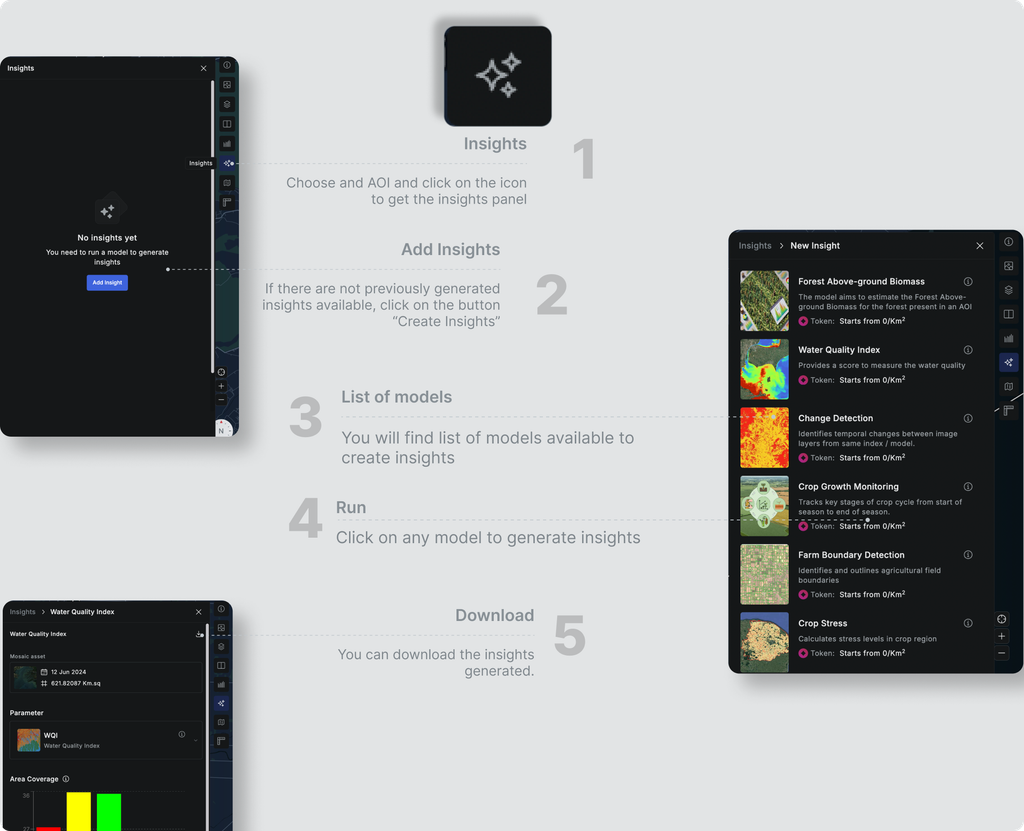
The insights feature helps to use analytical models on the current AOI on the go. Follow these simple steps to generate insights from a specific model:

  1. Choose an already Created AOI or Create a new AOI and click on the Insights button.
  2. You’ll see all the previously generated insights here if you have any. If not, click on the Create Insight button.
  3. There will be a list of models available to create insights.
  4. Click on the Run button to generate the model insight.
  5. You can download the created insights easily by clicking on the “Download” button.
  6. The model may require some input from the user end to generate the output.
Split CompareModel Marketplace