
Pixxel
Documentation
Developer Guide
Pixxel API
Overview
About PixxelPixxel's ConstellationPixxel's Tech Demonstrators

Getting Started
AuroraQuick Start

Tasking
Tasking Basics

Know Your Customer (KYC)Know Your Business (KYB)Navigation to Order DeskInitiating a New Tasking Order

Available BandsetsCustom Bandsets
Ordering and Cart
Archive OrderingWorking with CartOrder Listing, Status and Details
Catalog and Delivery
My CatalogExport ImageryNaming Convention
Explore Images & Create AOIs
ExploreSearch Location and Draw/Upload AOISearch and Select ImagesSatellite DataAOI Info and Scenes
Analytics Tools

Spectral SignatureSplit Compare
Analytical Models
Insights in Aurora (AOI Screen)Model Marketplace

Workflows
Workflow and Jobs
Aurora Intelligence
OverviewImage Search
Legal Documents
Third Party Satellite Provider Documents
Pixxel
Documentation
Developer Guide
Pixxel API
Overview
About PixxelPixxel's ConstellationPixxel's Tech Demonstrators

Getting Started
AuroraQuick Start

Tasking
Tasking Basics

Know Your Customer (KYC)Know Your Business (KYB)Navigation to Order DeskInitiating a New Tasking Order

Available BandsetsCustom Bandsets
Ordering and Cart
Archive OrderingWorking with CartOrder Listing, Status and Details
Catalog and Delivery
My CatalogExport ImageryNaming Convention
Explore Images & Create AOIs
ExploreSearch Location and Draw/Upload AOISearch and Select ImagesSatellite DataAOI Info and Scenes
Analytics Tools

Spectral SignatureSplit Compare
Analytical Models
Insights in Aurora (AOI Screen)Model Marketplace

Workflows
Workflow and Jobs
Aurora Intelligence
OverviewImage Search
Legal Documents
Third Party Satellite Provider Documents
  1. Tasking
  2. Access the Order Desk
  3. Navigation to Order Desk

Navigation to Order Desk

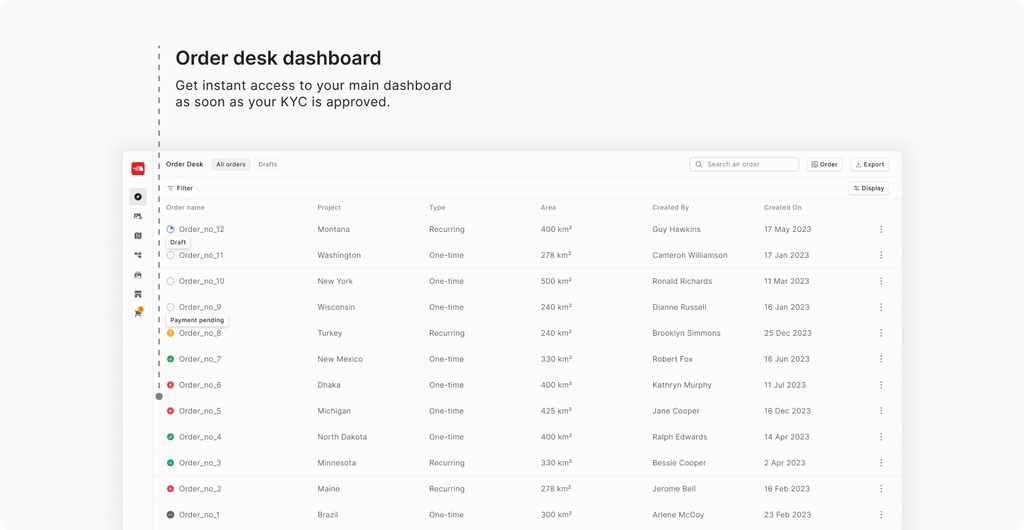
Once your KYC is approved, you’ll be directed to the main dashboard. If you haven’t placed any orders yet, you will see a clean slate with an empty Order Listing page.

Steps to reach the dashboard

  • Locate the “Order Desk” tab in the main navigation menu in the left panel of the platform. Click on it to open.
  • You will be directed to the Order Listing page, where you can see an overview of your previous orders (if any).
Know Your Business (KYB)Initiating a New Tasking Order
On this page
Steps to reach the dashboard