Pixxel
Documentation
Developer Guide
Pixxel API
Overview
About PixxelPixxel's ConstellationPixxel's Tech Demonstrators

Getting Started
AuroraQuick Start

Pricing OverviewPlansTokens

Billing DetailsBilling CyclesUpgrading and Downgrading
Payment MethodsRefunds
Tasking
Tasking Basics

Available BandsetsCustom Bandsets
Ordering and Cart
Archive OrderingWorking with CartOrder Listing, Status and Details
Catalog and Delivery
My CatalogExport ImageryNaming Convention
Explore Images & Create AOIs
ExploreSearch Location and Draw/Upload AOISearch and Select ImagesSatellite DataAOI Info and Scenes
Analytics Tools

Spectral SignatureSplit Compare
Analytical Models
Insights in Aurora (AOI Screen)Model Marketplace

Workflows
Workflow and Jobs
Aurora Intelligence
OverviewImage Search
Legal Documents
Third Party Satellite Provider Documents
Pixxel
Documentation
Developer Guide
Pixxel API
Overview
About PixxelPixxel's ConstellationPixxel's Tech Demonstrators

Getting Started
AuroraQuick Start

Pricing OverviewPlansTokens

Billing DetailsBilling CyclesUpgrading and Downgrading
Payment MethodsRefunds
Tasking
Tasking Basics

Available BandsetsCustom Bandsets
Ordering and Cart
Archive OrderingWorking with CartOrder Listing, Status and Details
Catalog and Delivery
My CatalogExport ImageryNaming Convention
Explore Images & Create AOIs
ExploreSearch Location and Draw/Upload AOISearch and Select ImagesSatellite DataAOI Info and Scenes
Analytics Tools

Spectral SignatureSplit Compare
Analytical Models
Insights in Aurora (AOI Screen)Model Marketplace

Workflows
Workflow and Jobs
Aurora Intelligence
OverviewImage Search
Legal Documents
Third Party Satellite Provider Documents
  1. Getting Started
  2. Pricing and Refund
  3. Billing and Subscriptions
  4. Upgrading and Downgrading

Upgrading and Downgrading

Our platform offers flexible subscription plans that can be upgraded or downgraded at any time based on your needs. Users can choose between a monthly or yearly billing cycle, with a 10% discount on the monthly price for yearly subscriptions. All payments are securely processed through Stripe.

Only the Workspace Owner can upgrade plans.

Available Plans

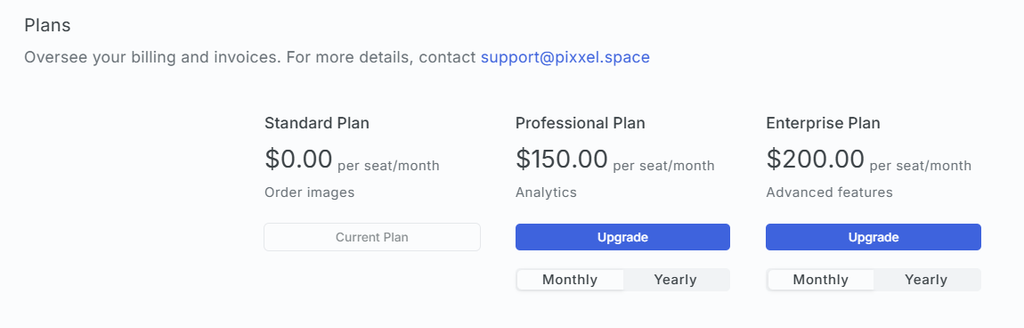
  • The Standard Plan is available at $0 per seat/month, allowing users to task Pixxel images. This is the default free plan for all users.
  • The Professional Plan costs $150 per seat/month and provides advanced enterprise features and compliance, making it suitable for large-scale operations.

For more info on plans, visit the Plans page.

Yearly Subscription Discount

If you opt for a yearly subscription, you receive a 10% discount on the monthly price.

For example:

  • Professional Plan (Yearly): $135 per seat / month
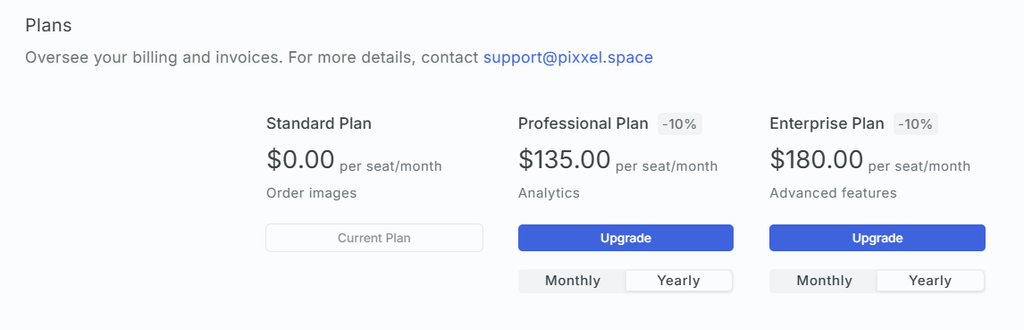
Upgrade your Subscription

To upgrade your subscription:

  • Navigate to the Plans section in Workspace settings.
  • Select the Professional plan.
  • Choose your billing cycle: Monthly Subscription or Yearly subscription.
  • Click Upgrade and proceed with payment via Stripe. Once the payment is successful, your plan will be upgraded instantly.
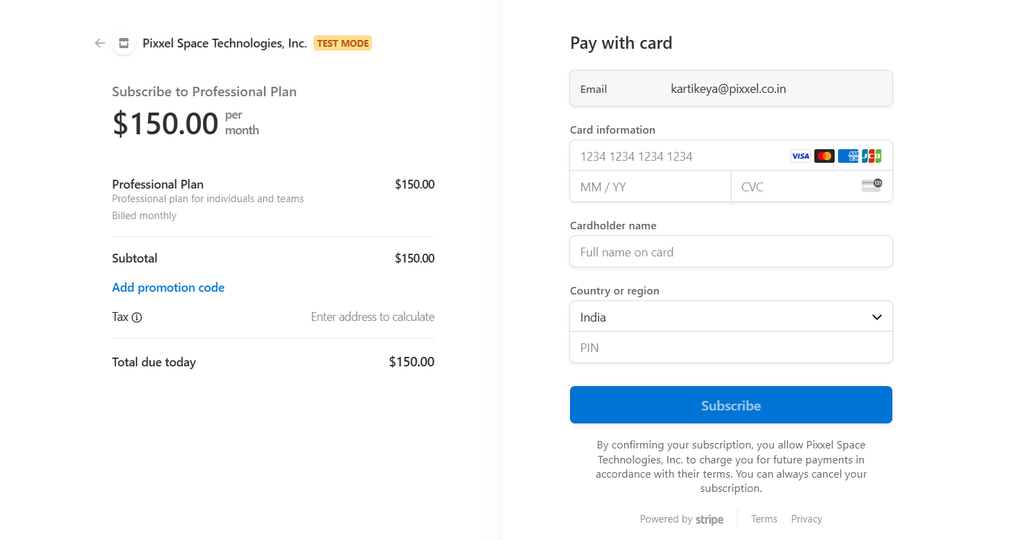
Once the Workspace Owner upgrades the plan, they will receive a notification/mail saying Plan successfully upgraded. The members of the workspace will receive a notification/mail of Your Workspace's Plan has upgraded.

Billing CyclesPayment Methods
On this page
Available PlansYearly Subscription DiscountUpgrade your Subscription