
Pixxel
Documentation
Developer Guide
Pixxel API
Overview
About PixxelPixxel's ConstellationPixxel's Tech Demonstrators

Getting Started
AuroraQuick Start

Tasking
Tasking Basics

Area of InterestTasking ProductsRecurring TaskingOff Nadir and Cloud CoverDelivery Speed & PackageFeasibility Check
Available BandsetsCustom Bandsets
Ordering and Cart
Archive OrderingWorking with CartOrder Listing, Status and Details
Catalog and Delivery
My CatalogExport ImageryNaming Convention
Explore Images & Create AOIs
ExploreSearch Location and Draw/Upload AOISearch and Select ImagesSatellite DataAOI Info and Scenes
Analytics Tools

Spectral SignatureSplit Compare
Analytical Models
Insights in Aurora (AOI Screen)Model Marketplace

Workflows
Workflow and Jobs
Aurora Intelligence
OverviewImage Search
Legal Documents
Third Party Satellite Provider Documents
Pixxel
Documentation
Developer Guide
Pixxel API
Overview
About PixxelPixxel's ConstellationPixxel's Tech Demonstrators

Getting Started
AuroraQuick Start

Tasking
Tasking Basics

Area of InterestTasking ProductsRecurring TaskingOff Nadir and Cloud CoverDelivery Speed & PackageFeasibility Check
Available BandsetsCustom Bandsets
Ordering and Cart
Archive OrderingWorking with CartOrder Listing, Status and Details
Catalog and Delivery
My CatalogExport ImageryNaming Convention
Explore Images & Create AOIs
ExploreSearch Location and Draw/Upload AOISearch and Select ImagesSatellite DataAOI Info and Scenes
Analytics Tools

Spectral SignatureSplit Compare
Analytical Models
Insights in Aurora (AOI Screen)Model Marketplace

Workflows
Workflow and Jobs
Aurora Intelligence
OverviewImage Search
Legal Documents
Third Party Satellite Provider Documents
  1. Tasking
  2. Tasking via Order Desk
  3. Recurring Tasking

Recurring Tasking

Recurring tasking is a powerful feature that enables you to schedule multiple satellite image captures over a specified period automatically. This is especially useful for monitoring use cases—such as tracking crop health, urban development, or environmental changes—where consistent, periodic imagery is required.

Instead of placing multiple separate orders, you set up one recurring order, and our system automatically schedules repeated captures for you. This means you always get updated imagery without having to re-order every time.


How Recurring Tasking Works

When you choose recurring tasking, you simply specify the start date, and either the end date or the number of occurrences you’d like. The system then automatically breaks your order into a series of occurrences, each representing one image capture within your defined schedule.

Steps to configure recurring tasking orders:

  1. Select Type: Choose the recurrence type from the dropdown based on your requirements.
  2. Start Date: Select the start date from when you need to start the first occurrence of the recurring order.
  3. End Date or Number of Occurrence: Once you have chosen the type and start date, you can either specify the number of occurrences or end date (the number of occurrences are auto-calculated based on this).
  4. View Occurrence: After you have filled all the details, you can verify the occurrences formed before placing the final order.
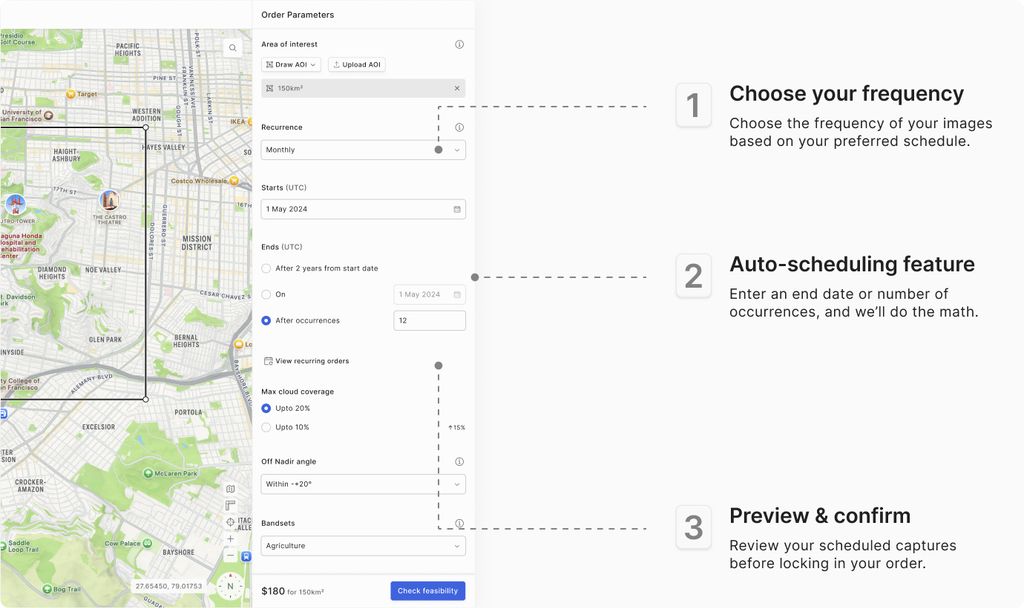
Note: All the capture window date selections are in UTC timezone only


Recurrence Options

Based on the timing you select, our system supports various recurrence intervals. Here’s a quick summary of the available options:

Note: This table is a simplified summary. Your actual schedule will depend on the dates you choose and our backend calculations, ensuring that the recurring order fits within operational constraints (like a maximum duration of 2 years).

Tasking ProductsOff Nadir and Cloud Cover
On this page
How Recurring Tasking WorksRecurrence Options