
Pixxel
Documentation
Developer Guide
Pixxel API
Overview
About PixxelPixxel's ConstellationPixxel's Tech Demonstrators

Getting Started
AuroraQuick Start

Tasking
Tasking Basics

Available BandsetsCustom Bandsets
Ordering and Cart
Archive OrderingWorking with CartOrder Listing, Status and Details
Catalog and Delivery
My CatalogExport ImageryNaming Convention
Explore Images & Create AOIs
ExploreSearch Location and Draw/Upload AOISearch and Select ImagesSatellite DataAOI Info and Scenes
Analytics Tools

Spectral SignatureSplit Compare
Analytical Models
Insights in Aurora (AOI Screen)Model Marketplace

Available Models

Model OverviewModel Quick Tour

Workflows
Workflow and Jobs
Aurora Intelligence
OverviewImage Search
Legal Documents
Third Party Satellite Provider Documents
Pixxel
Documentation
Developer Guide
Pixxel API
Overview
About PixxelPixxel's ConstellationPixxel's Tech Demonstrators

Getting Started
AuroraQuick Start

Tasking
Tasking Basics

Available BandsetsCustom Bandsets
Ordering and Cart
Archive OrderingWorking with CartOrder Listing, Status and Details
Catalog and Delivery
My CatalogExport ImageryNaming Convention
Explore Images & Create AOIs
ExploreSearch Location and Draw/Upload AOISearch and Select ImagesSatellite DataAOI Info and Scenes
Analytics Tools

Spectral SignatureSplit Compare
Analytical Models
Insights in Aurora (AOI Screen)Model Marketplace

Available Models

Model OverviewModel Quick Tour

Workflows
Workflow and Jobs
Aurora Intelligence
OverviewImage Search
Legal Documents
Third Party Satellite Provider Documents
  1. Analytical Models
  2. Models
  3. Segmentation
  4. Model Overview

Model Overview

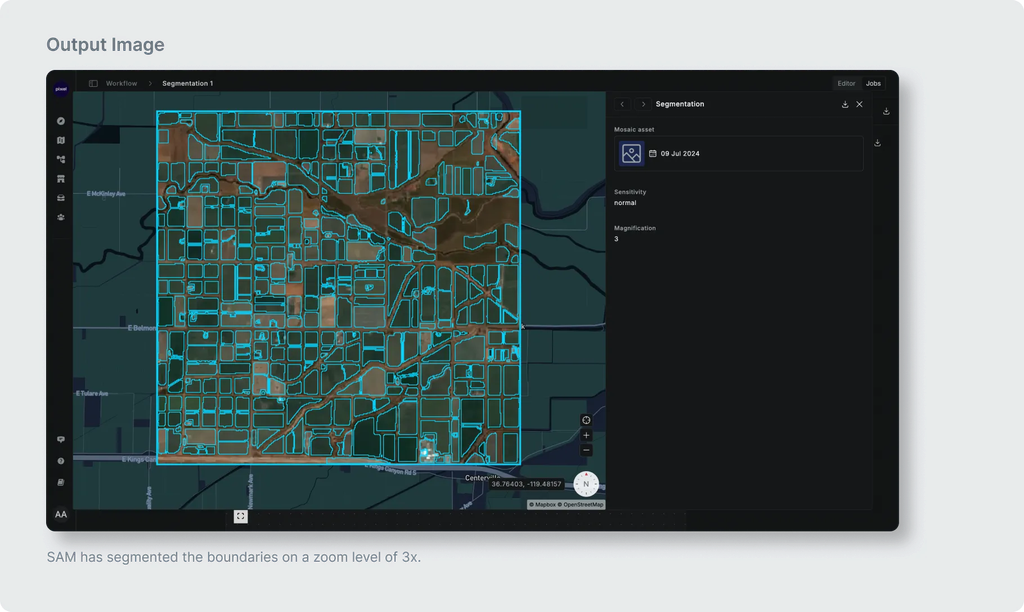
The Segmentation model is capable of segmenting all visible objects of interest in satellite imagery. It is compatible with any satellite imagery that has RGB bands including Sentinel-2, Landsat, and MODIS.

With that said, note that:

  • The model detects objects but does not classify them.
  • The model performance is best when all objects of interest are clearly visible and not too small.
  • Your source imagery resolution may be too coarse resulting in your objects of interest. For instance, some small farms in India might appear as objects covering less than 10 x 10 pixels. In that case, you may want to increase the zoom factor to greater than 3 when running the model so that the imagery is upscaled before running through the model resulting in much better performance.
Model Quick TourModel Quick Tour