
Model Overview
Satellite Data : Model is independent of the source of the satellite data.
The Change Detection model helps in detecting and analyzing temporal changes between image layers from identical models (such as LULC, Crop Stress, WQI etc. ) or analytical outputs (Indices such as NDVI, NDBI, SAVI, etc.). By comparing images captured at different times, it generates valuable insights with visual difference maps and quantified change (in sq km and percentage) to support critical applications in forestry, agriculture, climate technology, disaster management, and many more industries.
Potential Applications
- Forestry: Detect deforestation and afforestation, identify illegal logging activities through changes in Land Use Land Cover (LULC), and monitor forest health using indices like NDVI, SAVI, and EVI (Enhanced Vegetation Index).
- Agriculture: Detect changes on NDVI, EVI, and other vegetation indices to monitor crop growth and yield patterns, identify areas affected by pests or diseases, and assess irrigation practices and weather impacts.
- Climate Technology: Analyze shifts in ecosystems and habitats, monitor changes in land surface temperature and vegetation cover using indices like NDVI, LST (Land Surface Temperature), and LAI (Leaf Area Index), support climate adaptation strategies, and evaluate the impact of climate events through environmental impact assessments. Monitor changes in snow cover and assess snowmelt patterns using NDSI (Normalized Difference Snow Index).
- Disaster Management: Assess damage from natural disasters such as floods, wildfires, and earthquakes, track changes in infrastructure and land use post-disaster with LULC models and indices like NDWI (Normalized Difference Water Index) and NBR (Normalized Burn Ratio), and evaluate the impact of disasters to facilitate rapid response and recovery efforts.
- Urban Planning: Monitor urban expansion, identify changes in land use, and manage infrastructure development effectively using indices like NDBI, built-up area indices, and LULC models.
- Defense: Enhance security by detecting unauthorized activities and changes in sensitive areas.
Model Inputs
Two layers need to be generated from any model like Land Use Land Cover (LULC), Crops Stress, WQI, etc. or any Indices like NDVI, NDBI, etc. These two layers will then be used as input to this change detection model.
If the image inputs are indices, custom class names such as High Vegetation, Medium Vegetation, and Low Vegetation, along with their corresponding value ranges, are also required.
Model Output
The output will be the change between the reference layer and comparison layer which can be visualized in two modes.
- Raster of Delta Mode: Raster of delta is a raster which highlights the areas of change. This mode is helpful to visualize the change from a bird’s eye view and detect where the change has been maximum or minimum according to the requirement.
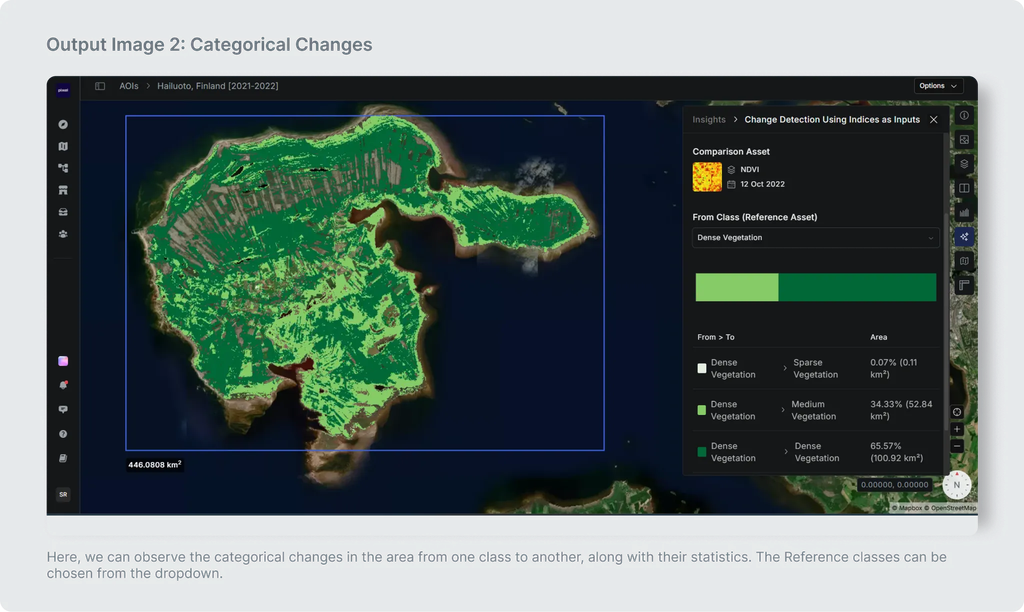
- Categorical Statistics : This output helps to see from which reference class how much changes have been observed with their statistics.
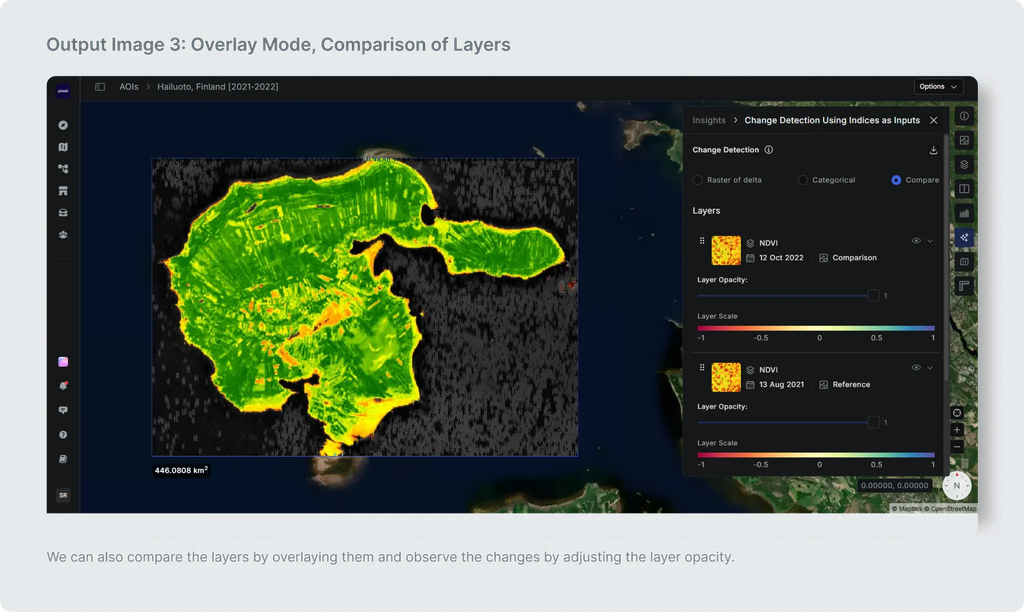
- Overlay Mode: This feature helps users visually compare the changes between the two datasets by blending them together, highlighting differences in a more intuitive manner.
The outputs consist of statistical metrics for the reference layer, comparison layer, and the change detection layers between them. All of these are available in JSON and geotiff format to download.
For LULC, the difference map illustrates whether there's a change in class for each pixel. For indices, the maps display the relative difference in values.
USE CASE 1
Change Detection [For Layers generated Via a Model (e.g. LULC)]
Input
| Input Name | Description |
|---|---|
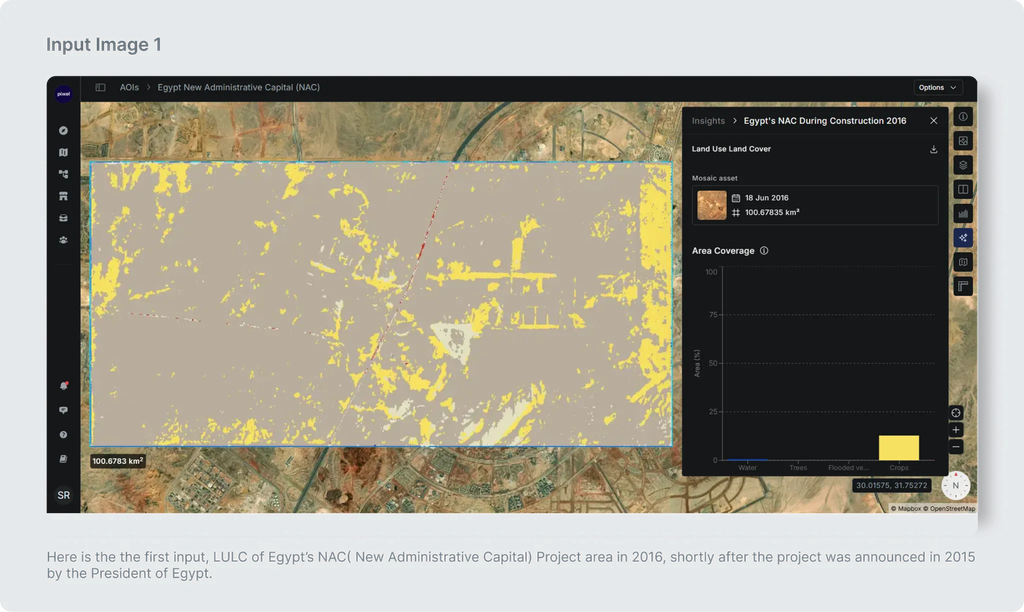
| Reference Image | Raster layer which is used as a baseline image against which changes are detected. It represents the scene or area of interest at a specific point in time. For this case we are using a layer generated from a model i.e LULC. |
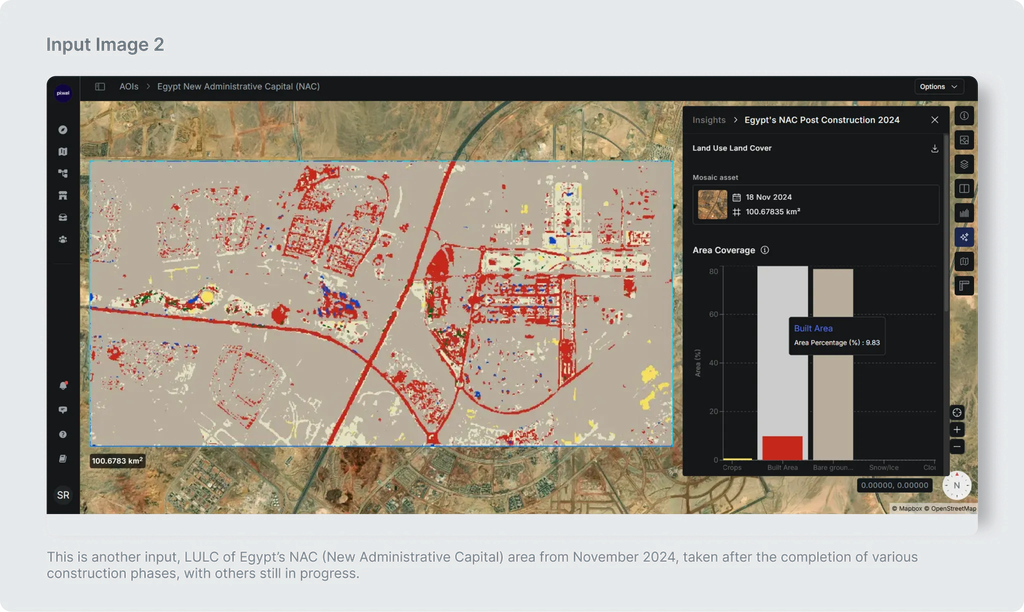
| Comparison Image | Raster layer which will be compared against the reference image to detect changes over a period of time. For this case we are using a layer generated from a model i.e LULC. |
Input Image 1
Input Image 2
Output
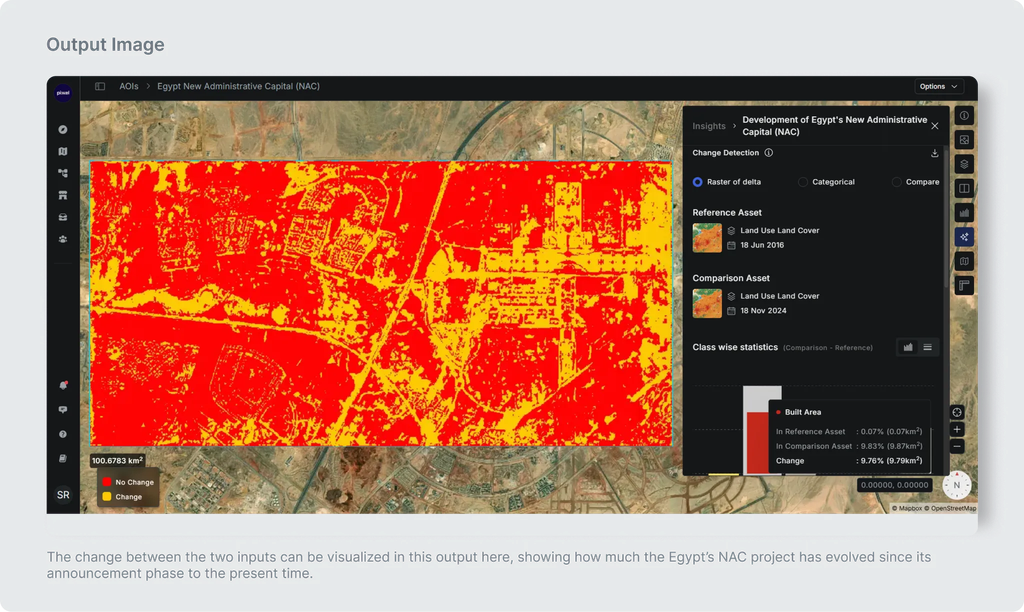
The Change Detection output represents the difference between the reference layer and the comparison layer, which can be visualized in three modes:
- Raster of Delta Raster of delta is a raster which highlights the areas of change. This mode is helpful to visualize the change from a bird’s eye view and detect where the change has been maximum or minimum according to the requirement. We can also see the Class wise statistics with area and their percentage of the changes observed from Reference Image to Comparison Image.
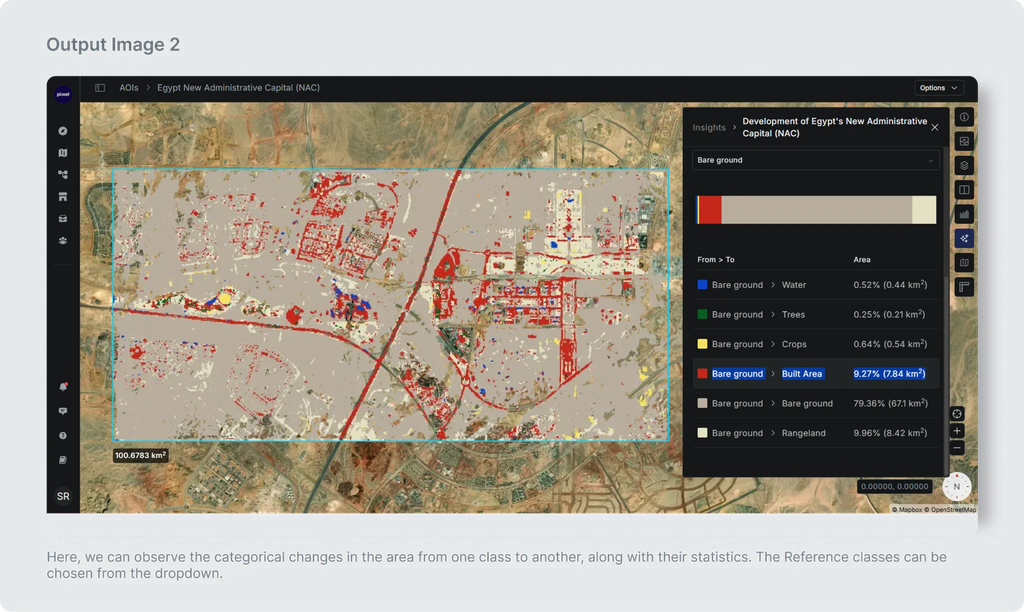
- Categorical changes from Reference classes: We can see from which reference class how much changes have been observed with their areas and percentage change.
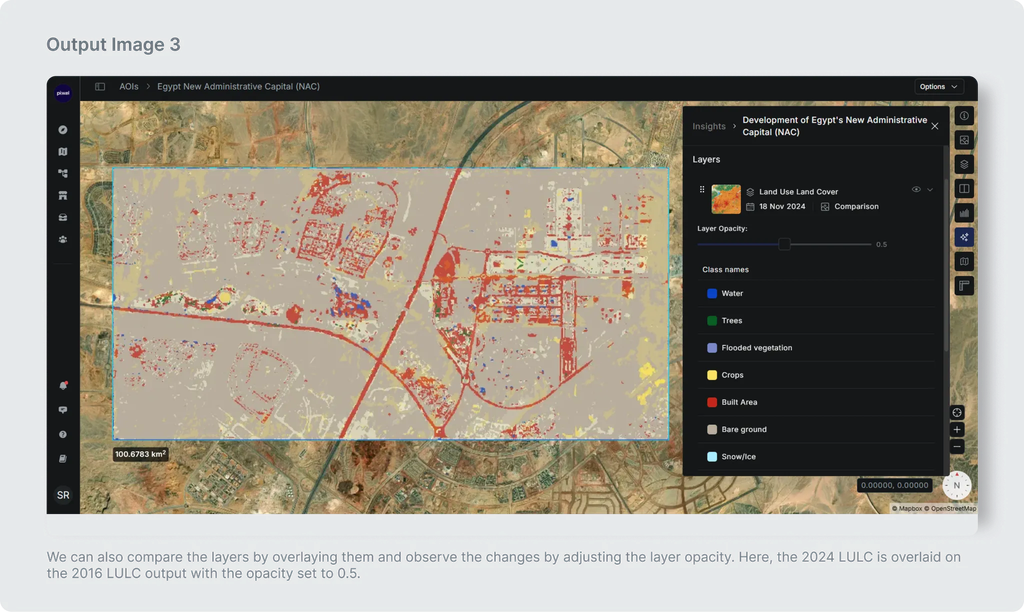
- Comparison of Layers or Overlay Mode: This feature helps users visually compare the changes between the two datasets by blending them together, highlighting differences in a more intuitive manner.
USE CASE 2
Change Detection [For Layers generated via an Index (e.g. NDVI) ]
In the case of LULC model inputs, the mapping of class names(Water, Trees, Crops etc.) is preset. However, if the image inputs are indices, then custom class names are required such as High Vegetation, Medium Vegetation, Low Vegetation, etc. with their range values.
Input
| Input Name | Description |
|---|---|
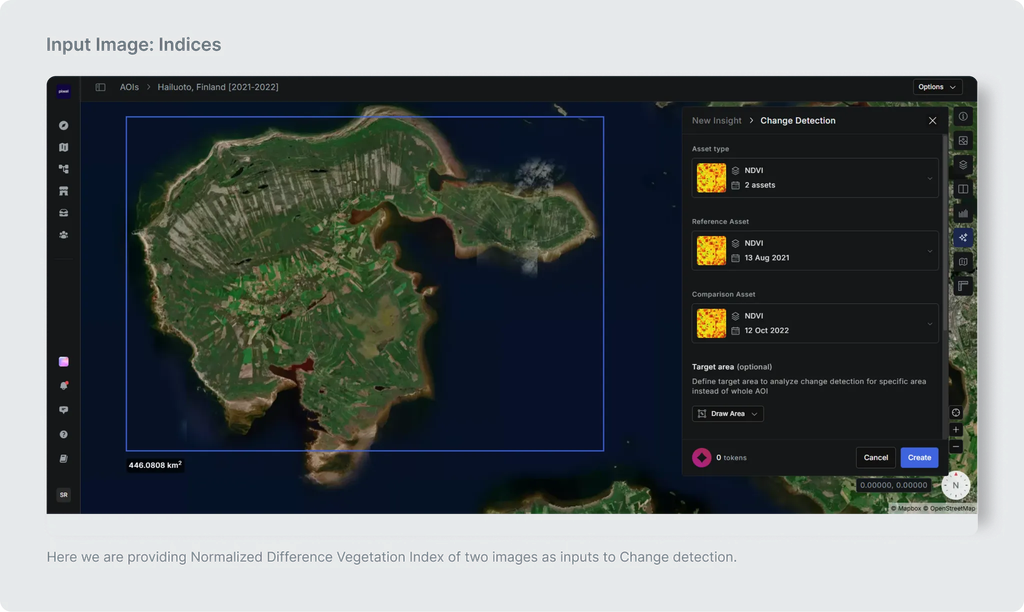
| Reference Image | Index layer which is used as a baseline image against which changes are detected. It represents the scene or area of interest at a specific point in time. For this case we are using a layer generated from an Index i.e NDVI. |
| Comparison Image | Index layer which will be compared against the reference image to detect changes over a period of time. For this case we are using a layer generated from an Index i.e NDVI. |
| Class Names | In the case of LULC model inputs, the mapping of class names is preset. However, if the image inputs are indices, then custom class names are required such as High Vegetation, Medium Vegetation, Low Vegetation, etc. |
| Class Range | Range of values for each class like 0 to 0.2, 0.2 to 0.7, 0.7 to 1 |
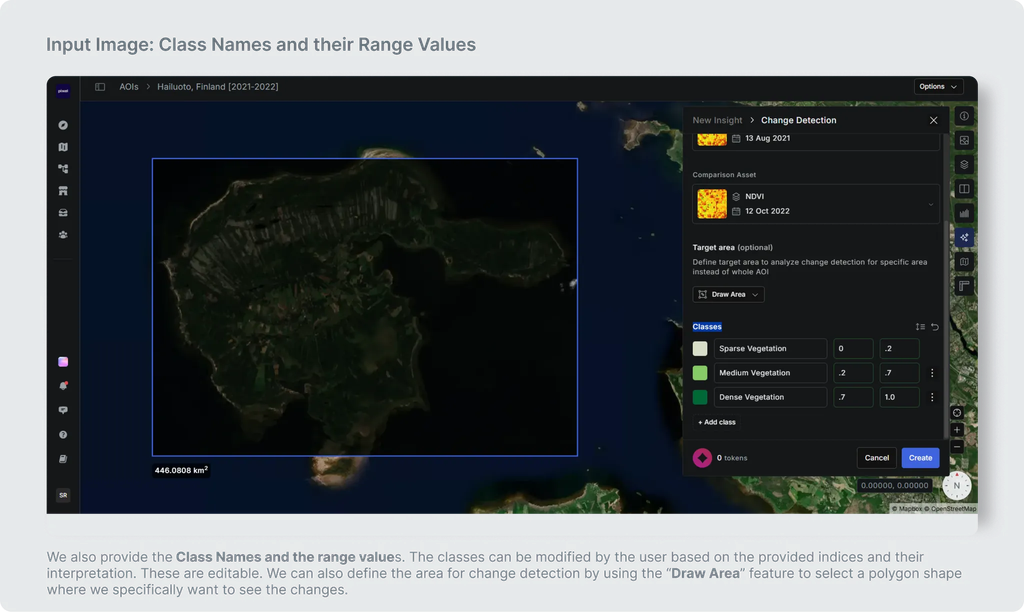
In the above image we are providing Class Names and the range values as additional inputs from the previous demo.
Output
The Change Detection output represents the difference between the reference layer and the comparison layer, which can be visualized in three modes: [Same as Explained in Previous demo]
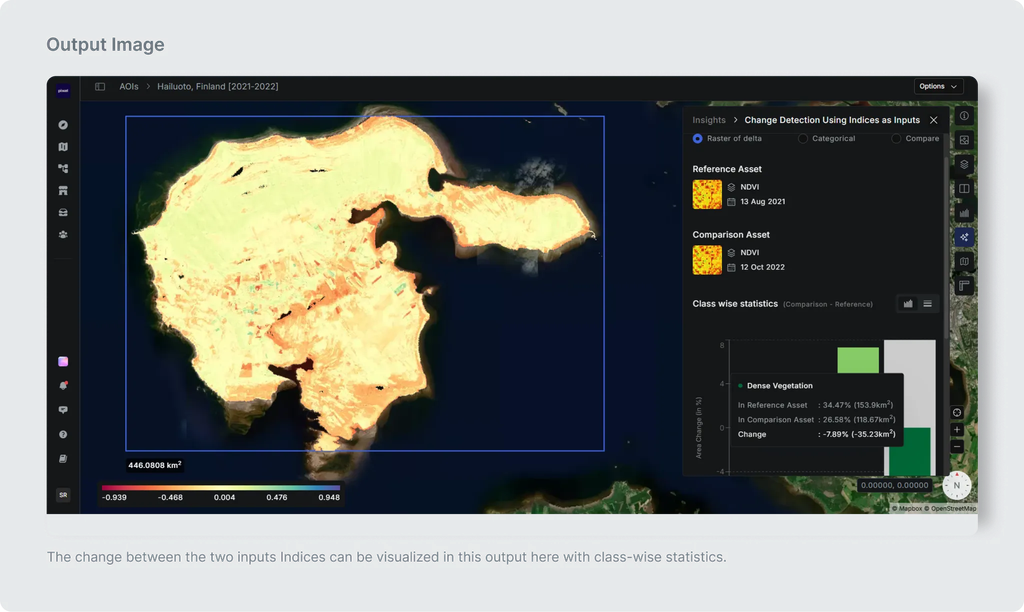
- Raster of Delta
Raster of delta is a raster which highlights the areas of change. This mode is helpful to visualize the change from a bird’s eye view and detect where the change has been maximum or minimum according to the requirement. We can also see the Class wise statistics with area and their percentage of the changes observed from Reference Image to Comparison Image.
- Categorical changes from Reference classes:
We can see from which reference class how much changes have been observed with their areas and percentage change.
- Comparison of Layers or Overlay Mode:
This feature helps users visually compare the changes between the two datasets by blending them together, highlighting differences in a more intuitive manner.
Additional Details
Minimum size of Area of Interest required (in Sq KMs.): 10
Maximum size of Area of Interest supported (in Sq KMs.): 5000
Geographies supported: All geographies
Sensors Supported: Landsat-8 and 9, Sentinel-2, Modis NBAR Daily, Pixxel-D2, Shakuntala, Sentinel-1 (RTC), MODIS LSTE 8-Day, MODIS Surface Reflectance 8-Day, EO-01 Hyperion